
Some of the links below are affiliate links, meaning that I will earn a commission if you click and make a purchase. This is at no extra cost to yourself.
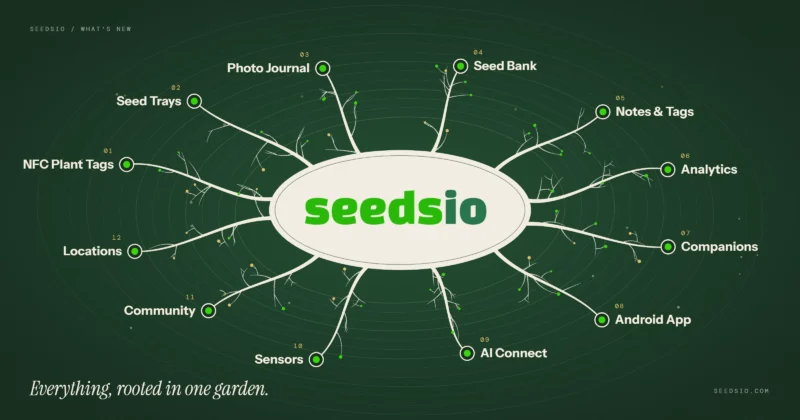
SeedsIO has had quite a few updates over the past few months, including smarter garden notes, improved seed tray management, new Seed Bank features and some interesting AI integrations. I’ve been working on making the platform easier and quicker to use, particularly when you’re out in the garden and just want to record what you’ve been doing without spending ages filling in forms.
Here’s a look at some of the more interesting additions.
Smarter Garden Notes: Less Typing, Less Fuss

One of the things I’ve wanted to improve for a while is the process of adding notes to your plants.
Previously, you had to manually select a category every time you added a note. It worked, but it was a little clunky, and looking at how people actually used SeedsIO, most gardeners rarely changed the category anyway.
So I’ve completely reworked how notes are categorised.
You now have three ways to add notes:
- 🤖 Automatic: Just write your note and let SeedsIO work out the appropriate category, tags and mood when you save it.
- 💡 Smart Suggestions: As you type, SeedsIO suggests categories and tags. You can accept them, remove them or add your own.
- ✍️ Choose Yourself: Prefer the original manual approach? That’s still available.
I’ve also simplified the categories down to three: Observation, Action and Issues.
The detail now comes from 30 different tags covering everything from sowing, germination and feeding to harvesting, pest problems, deficiencies and more.
There’s also optional mood tracking, which identifies notes as Positive, Neutral or Concern. This should become particularly useful when reviewing your plants’ progress over a growing season.
A bit of clever technology behind the scenes
The new system combines machine learning with hundreds of gardening-specific rules I’ve developed.
It can understand context, such as the difference between discovering aphids on your plants and having successfully dealt with them. It can also recognise when a problem hasn’t been resolved.
The system improves as gardeners correct its suggestions, and everything runs directly on SeedsIO’s own servers. Your notes aren’t sent to an external AI service.
I’ve also processed approximately 140,000 existing notes, applying the new categories and tags to historical records. So even notes you made years ago can benefit from the improvements.
The aim is simple: spend less time managing your notes and more time growing.
Seed Trays Now Work in the Android App, Even Offline
This is another addition I’m particularly pleased with.
You can now manage your seed trays directly from the SeedsIO Android app.
That includes:
- Sowing seeds into individual tray cells.
- Recording germination.
- Potting up seedlings.
- Adding notes.
- Scanning NFC tags to identify and populate tray cells.
And it works offline.
If you’re in the greenhouse, polytunnel or somewhere without a reliable internet connection, you can still work with your trays. Your changes will sync when you’re connected again.
The latest Android update (version 0.5.3) also brings the new smart note categorisation and tagging features to the app, including notes created offline.
A More Useful Seed Bank
I’ve also made several improvements to the Seed Bank, particularly for gardeners with larger seed collections.
You can now organise your seeds into custom categories, making it easier to separate different types of seeds or organise your collection however you prefer.
Categories can be used for filtering and sorting, and you can assign them to multiple seeds at once.
I’ve also added:
- CSV export: Download your entire Seed Bank for backup or use elsewhere.
- CSV import: Bring existing seed collections into SeedsIO.
- Linked plants: See which plants you’ve grown from particular seed entries.
- Notes and photos: Keep additional information alongside your seeds.
- More seed details: Record information such as isolation, stabilisation and previous growing experience.
The Seed Bank allocation has also been increased, giving you room for more entries.
For those of us who collect far too many chilli varieties, these changes should make keeping track of everything considerably easier!
Talk to Your Garden Using AI (Early Access)
This is something I’ve been experimenting with recently, and I think it has some interesting possibilities.
I’ve been developing an integration that allows AI assistants, such as Claude, to interact with your SeedsIO data.
Rather than manually searching through your growing records, you could ask questions such as:
- “Give me a breakdown of the species of chillies I am growing.”
- “Do I have enough tomato plants to make 10 litres of tomato sauce at the end of the year?”
- “Which chilli varieties had the best germination rates last season?”
- “How often did I feed my plants last year?”
- “What seeds do I have available that I haven’t grown yet?”
- “Show me the problems I recorded with my cabbages.”
The idea is to make all that information you’ve been recording over the years easier to use.
It’s currently in early access, with a limited number of users testing the integration. If you’re interested in trying it, get in touch.
Connecting SeedsIO with SpicyIoT
Another addition this year has been the integration with SpicyIoT, my separate platform for monitoring and automating growing environments.
If you’re using SpicyIoT to monitor temperatures, humidity or other growing conditions, you can now connect your SpicyIoT account to SeedsIO.
You can set up the connection from your SeedsIO profile and manage the integration through your Garden Shed.
It’s another step towards bringing plant records and growing environment information together.
Lots of Smaller Improvements Too
Alongside these larger additions, I’ve been making plenty of smaller changes to improve the experience.
Plant pages are tidier, seed trays are easier to switch between, photos in notes display more reliably, and there have been improvements to the layout and usability of various pages.
I’ve also continued improving the Android app, which launched earlier this year, with a particular focus on making it practical to use while you’re actually working with your plants.
What’s Next for SeedsIO?
A lot of my recent work has focused on removing unnecessary steps and making the information you record more useful.
I want SeedsIO to be something you can quickly update while you’re watering, potting up or harvesting, rather than another task you have to sit down and complete afterwards.
At the same time, features like smarter note tagging and AI assistant integration open up some interesting possibilities for analysing your growing history and learning from previous seasons.
There’s plenty more I want to do, and as always, feedback from people actually using SeedsIO helps shape what I work on next.
If you haven’t tried SeedsIO recently, now’s a good time to take another look.
Visit SeedsIO.com or download the Android app from Google Play.
And if you’ve got suggestions for improvements or features you’d like to see, let me know!